Why you need human-in-the-loop in AI workflows


PeopleImages // Shutterstock
AI systems can route messages, update records, make decisions, and trigger entire workflows across multiple apps without you touching anything. But as AI shifts more and more from being an assistive tool to powering autonomous systems, humans have a new kind of responsibility: making sure nothing goes wrong.
Even the smartest AI systems still struggle to understand nuance, edge cases, or the unwritten rules teams use to make decisions. When autonomous agents act without that context, small gaps can quickly turn into big problems. That’s where human-in-the-loop (HITL) comes in.
Instead of letting an AI system run unchecked, you can design checkpoints where humans step in with experience, context, and common sense. This intervention ensures that the decisions that should involve humans actually do involve humans. And with an AI orchestration tool, you can build those checkpoints directly into an AI workflow.
Zapier shares what human-in-the-loop really means, why it’s necessary, and some practical patterns for adding HITL to agentic workflows.
What does human-in-the-loop mean?
Human-in-the-loop refers to the intentional integration of human oversight into autonomous AI workflows at critical decision points. Instead of letting an agent execute tasks end-to-end and hoping it makes the right call, HITL adds user approval, rejection, or feedback checkpoints before the workflow continues.
Let’s say you’re building an automated lead gen system that identifies potential customers, adds them to your CRM, and sends out targeted emails. Most of that work can run autonomously, but you might need human approval if the agent wants to update an existing customer record or maybe to review emails before they get sent.
And it’s not about being a control freak (although it’s great for that too). HITL gives you all the benefits of AI automation running at full speed, plus peace of mind when decisions carry risk, nuance, or downstream impact. It prevents irreversible errors, ensures compliance in regulated scenarios, and catches ethical issues that AI might overlook. Every approval, rejection, or correction from a human to the AI workflow also becomes training data for the agent. Over time, AI systems learn from your feedback and improve performance.
With an AI orchestration tool, you can build human-in-the-loop steps and checkpoints directly into your AI workflows and AI agents. That means no extra setup for HITL, and you’ll be able to log every pause, human decision, and context for compliance and review.
When should you use HITL in AI workflows?
If you have an AI agent taking action on your behalf, think hard about where you might need a human in the loop. While the goal of AI automation is speed, speed becomes less relevant when AI makes a bad judgment call. HITL acts as a safety net that defines when, where, and how to include humans before an automated workflow continues.
Here are a few general situations where agentic workflows should pause and request human oversight, but you should look at each of your workflows on a case-by-case basis.
Low confidence or ambiguity
Imagine a customer message comes in: “My invoice is wrong, and I need this fixed ASAP.” Is that a billing dispute? A refund request? A technical issue?
If the agent can’t confidently classify the message, the workflow should pause and escalate to a human instead of guessing (which we know AI loves to do). This also applies when an agent’s confidence score in a particular situation falls below a pre-defined (by you) threshold.
Sensitive actions
If there are actions that could lead to accidental data loss or permanent errors, you need a human in the loop. For example, you’ll want an HITL checkpoint when executing actions like overwriting customer records or deleting data. Your risk tolerance here comes into play, but it’s better to start with more HITL and then pull back if you see the AI working well.
Regulatory and compliance implications
Where actions carry regulatory or compliance implications, you need to add human oversight. For example, if an agent drafts a contract, a human lawyer should review all language before anything gets sent or signed.
Anything requiring empathy
Tasks and decisions that require empathy and human judgment shouldn’t be left to AI alone. AI agents can do a lot, but they can’t truly empathize with another human, and if they try, it’ll be immediately discarded (rightfully so) as disingenuous. You also need to consider potential bias in AI. Of course, humans are also biased, but having an HITL checkpoint whenever bias might come into play can help avoid potential issues.
How to add human-in-the-loop to AI workflows
Zapier
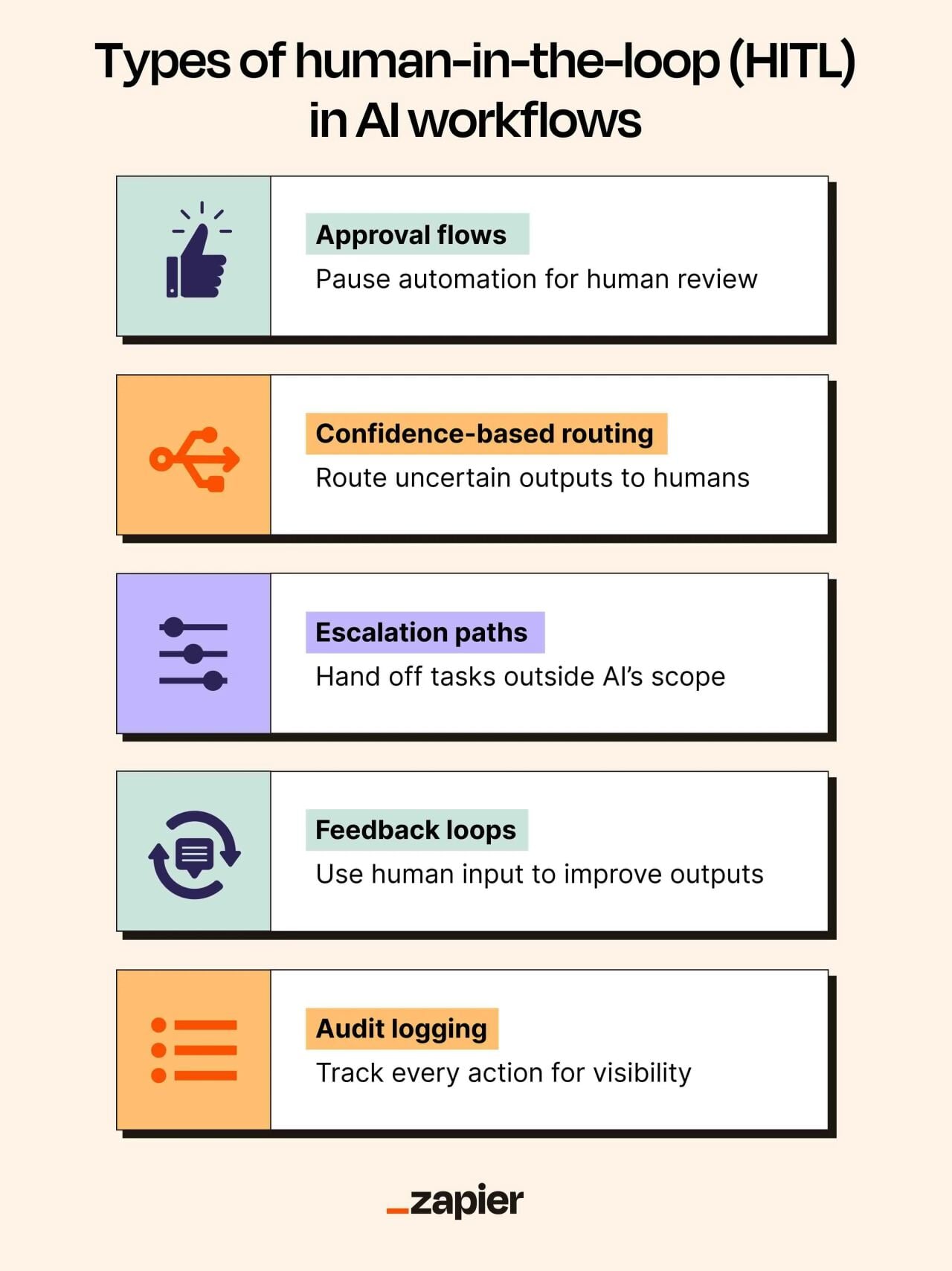
Once you’ve identified where human judgment matters, the next step is to actually build those checkpoints into your AI workflow.
Human-in-the-loop can take several forms, including approvals, requests for context, or verification steps. But it doesn’t mean slowing down automation or reviewing every action. Instead, the goal is to let the workflow run on its own until it reaches a point where human input is required.
Here are some practical patterns for adding human oversight into an agentic workflow, along with some actionable ways to add them to your work.
Approval flows
Approval flows involve pausing an agent’s workflow at a pre-determined checkpoint until a human reviewer approves or declines the agent’s decision.
The team at SkillStruct uses this approval flow to review all AI-generated career recommendations before they reach users. After generating a career recommendation based on a user’s profile, the AI system sends an email alert to the development team. From there, a developer uses a custom app to review the output. If approved, the recommendation is shown to the user, while rejected content is deleted.
Confidence-based routing
Confidence-based routing pulls in a human if the AI agent encounters ambiguity. For this pattern, the agent’s instructions include a defined confidence score, and if its confidence falls below the threshold, it automatically defers to a human.
Confidence-based routing is ideal for agentic workflows that handle a wide range of usually clear-cut tasks (like categorizing incoming customer requests) but require a fallback mechanism for ambiguous edge cases.
For example, the owner of Tradesmen Agency built an AI-orchestrated invoice processing system that autonomously handles invoices, parsing attachments with Llama Parse, and extracting structured data using a large language model and an AI orchestration tool. But whenever the system encounters exceptions or uncertain results (like missing or conflicting data fields, a vendor or PO not found in Entrata records, or validation confidence below a certain threshold), the workflow routes the case into an exception log and sends an email notification for manual review. From there, a human reviewer can validate the data, correct details, or approve the record for upload.
Escalation paths
With escalation paths, a human operator can step in when an action falls outside an agent’s scope, to keep the automation from failing.
Say an AI agent tasked with processing refund requests encounters a request above its value threshold. Instead of retrying endlessly and stalling the workflow, the agent routes the task to finance with a note like “refund request exceeds automated limit, needs human review.”
Feedback loops
Feedback loops allow a human to work alongside an AI agent by building feedback mechanisms directly into the workflow. When agents execute a task, a reviewer can evaluate it, give a quick thumbs-up, or provide more detailed feedback to correct the agent so the correction becomes input for future iterations.
For instance, the team at ContentMonk uses an AI content system to automate 70%-80% of their content ops. Human operators work alongside the AI system to provide insight and review outputs at different stages of the content production process, while the system automates the writing. Before a brief is generated, a human gives input with details such as tone of voice, ICP, messaging framework, and brand guidelines. The AI-generated brief is then reviewed, edited, and approved before a draft is generated. Once the draft is ready, a human reviews it again to ensure it meets brand requirements before adding images and publishing.
Audit logging
Not every agentic workflow needs a human to stop and approve decisions in real time. Sometimes you just need visibility, and audit logging lets automation run at full speed while recording every action for later review.
For instance, if any agent updates CRM records after a customer call, each change is automatically logged: what changed, when it changed, and why. No approvals needed, no workflow interruptions. Audit logs give humans traceability without creating hard stops, making them ideal for workflows where oversight matters but immediate human intervention doesn’t.
Why does human-in-the-loop matter?
HITL steps allow AI and automation to move fast while keeping you in control of the decisions that carry risk, involve more nuance than AI can handle, or require human accountability.
Plus, with feedback loops in place, human corrections become training data, which makes AI agents smarter and more aligned with your preferred outcomes. When humans guide the moments where AI lacks context or judgment, the system becomes more reliable and adaptive over time.
Equally as important: Approvals, escalation points, and audit logs give teams visibility into AI workflows and reasoning, helping reduce the black-box effect of AI. This supports internal accountability and transparency at a company, as well as coming into play during compliance auditing and internal reviews.
Add HITL into your AI workflows and agents
Autonomous AI is impressive, but it comes with trade-offs. An AI agent may know what to do but lack the context to understand why. Risky, to say the least.
By adding human-in-the-loop checkpoints at key decision moments, you inject context, judgment, and accountability into the workflow. This prevents the kinds of outcomes that damage trust: a refund issued to the wrong customer, data overwritten in your CRM, a compliance error, or even just messaging that doesn’t match your brand.
This story was produced by Zapier and reviewed and distributed by Stacker.


